Middleware, Guard, Pipes, and Interceptor
Middleware
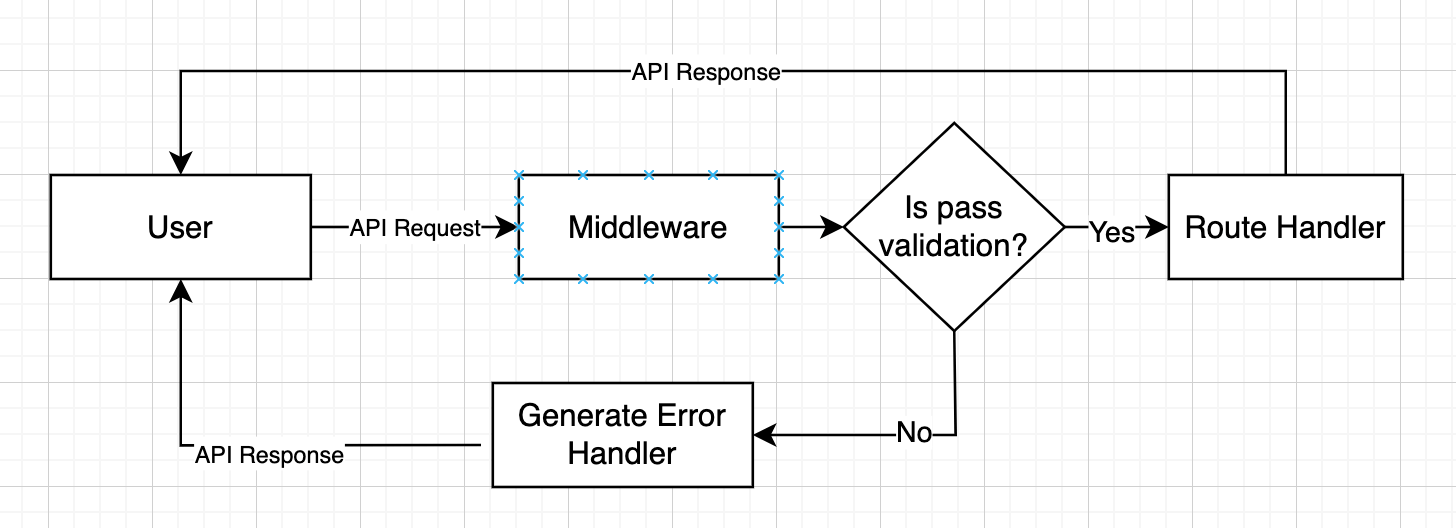
Middleware is a function that called before the route handler. The middleware can be used to intercept flow that need another handler before it get execute by the route handler such as logger. You can implement the auth handler in Middleware but for better implementation you can use Guards.
Nest middleware are, by default, equivalent to express middleware. - Source
Applying middleware
Example, Nest JS apply middleware
Details
import { Injectable, NestMiddleware } from '@nestjs/common';
import { ulid } from 'ulidx';
import { Request, Response, NextFunction } from 'express';

@Injectable()
export class LoggerMiddleware implements NestMiddleware {
  use(req: Request, res: Response, next: NextFunction) {
    const traceId = ulid();
    if (!req.headers?.traceId) {
      req.headers.traceId = traceId;
    }
    res.setHeader('traceId', traceId);
    next();
  }
}import { Injectable, NestMiddleware } from '@nestjs/common';
import { ulid } from 'ulidx';
import { FastifyRequest, FastifyReply } from 'fastify';
@Injectable()
export class LoggerMiddleware implements NestMiddleware {
use(req: FastifyRequest['raw'], res: FastifyReply['raw'], next: () => void) {
const traceId = ulid();
if (!req.headers?.traceId) {
req.headers.traceId = traceId;
}
res.setHeader('traceId', traceId);
next();
}
}For fastify, you can enable the log by passing logger to true in FastifyAdapter.
new FastifyAdapter({ logger: true })Guards
Guards have a single responsibility. They determine whether a given request will be handled by the route handler or not, depending on certain conditions (like permissions, roles, ACLs, etc.) present at run-time. This is often referred to as authorization. But middleware, by its nature, is dumb. It doesn't know which handler will be executed after calling the next() function. On the other hand, Guards have access to the ExecutionContext instance, and thus know exactly what's going to be executed next. - Source
HINT
Guards are executed after all middleware, but before any interceptor or pipe.
import { Injectable } from '@nestjs/common';

@Injectable()
export class AuthGuard {
  async canActivate(context) {
    const request = context.switchToHttp().getRequest();
    return validateRequest(request); // Custom function return boolean to verify the request
  }
}import { Injectable, CanActivate, ExecutionContext } from '@nestjs/common';
import { Observable } from 'rxjs';
@Injectable()
export class AuthGuard implements CanActivate {
canActivate(
context: ExecutionContext,
): boolean | Promise<boolean> | Observable<boolean> {
const request = context.switchToHttp().getRequest();
return validateRequest(request); // Custom function return boolean to verify the request
}
}Every guard must implement a canActivate() function. This function should return a boolean, indicating whether the current request is allowed or not. It can return the response either synchronously or asynchronously (via a Promise or Observable). Nest uses the return value to control the next action:
- if it returns
true, the request will be processed. - if it returns
false, Nest will deny the request.
Pipes
Built-in pipes
NestJS comes with 9(nine) pipes available exported from the @nestjs/common package:
ValidationPipeParseIntPipeParseFloatPipeParseBoolPipeParseArrayPipeParseUUIDPipeParseEnumPipeDefaultValuePipeParseFilePipe
Binding Pipes
Interceptor
Each interceptor implements the intercept() method, which takes two arguments. The first one is the ExecutionContext instance (exactly the same object as for guards). The ExecutionContext inherits from ArgumentsHost. We saw ArgumentsHost before in the exception filters chapter. There, we saw that it's a wrapper around arguments that have been passed to the original handler, and contains different arguments arrays based on the type of the application. You can refer back to the exception filters for more on this topic. - Source