Bun as Package Manager
Run bun install
If you want to fresh install packages from your package.json file, you could run:
bash
$ bun installI generate template application from remix, by running this command:
bash
$ bun create remix bunjs-remixI tried to compare the speed installation bun compare to pnpm, yarn, and npm, and the result is very exceptional. Bun is really fast compare to others. You could also try to compare to make sure the result is also proper for you. hyperfine install documentation
After finished, you could run this command:
bash
$ hyperfine --prepare 'rm -rf node_modules' --warmup 1 --runs 3 'bun install' 'pnpm install' 'yarn' 'npm install'The generated result from my local laptop. 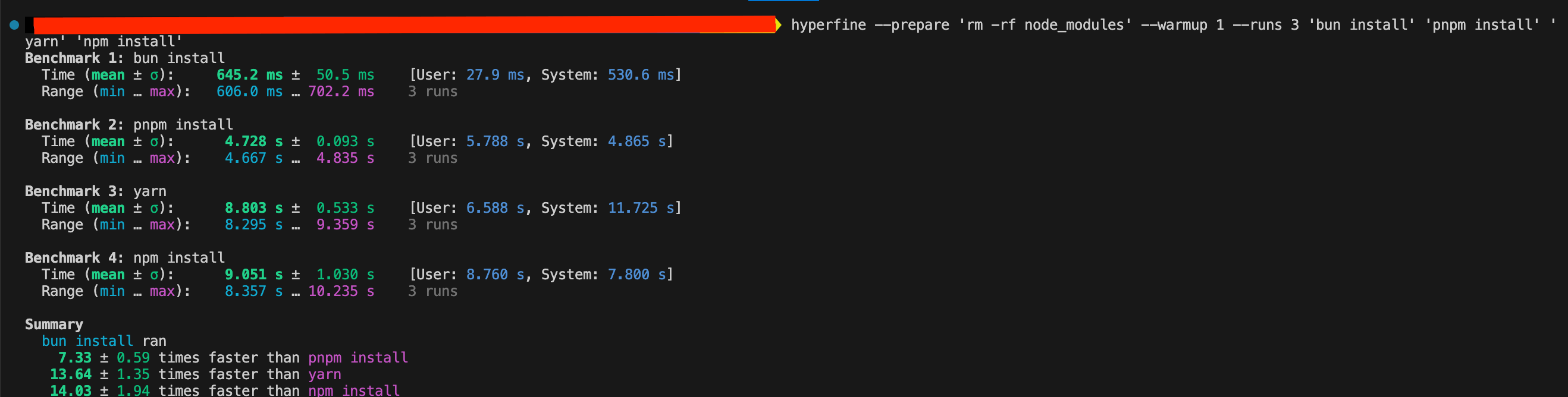
Run bun add
Most implementation similar to other package managers.
- For install as dependencies:
bash
$ bun add <package_name>bash
$ bun add <package_name>@x.y.z- For install as devDependencies:
bash
# you could use `--development`, `-d`, or `-D` as well
$ bun add -D <package_name>
bash
# you could use `--development`, `-d`, or `-D` as well
$ bun add -D <package_name>@x.y.z
Run bun remove
To remove dependency, run this command:
bash
$ bun remove <package_name>