Profiles
Managing Application with Profiles
- For example, you want to set different log level in Development and Production Environments.
| Log Level Spring Framework | Description |
|---|---|
| trace | more detailed information about the flow of the system |
| debug | Information about the flow of the system |
| info | events occurring at the run time |
| warning | warning for the errors caused due to the usage of deprecated APIs. |
| error | runtime errors |
| off | turn off the log |
- For example, you have 2 environments,
devandprod. Then, you can create 2 (two) properties.application-dev.propertiesandapplication-prod.properties
properties
logging.level.org.springframework=info

nestapp-service.url=http://localhost:8081
properties
server.port=8085 // custom port
logging.level.org.springframework=info
properties
server.port=8081 // custom port
spring.profiles.active=dev // or prod or other environments
java
package com.alibaihaqi.springboot.springapp;

import org.springframework.boot.context.properties.ConfigurationProperties;
import org.springframework.stereotype.Component;

@ConfigurationProperties(prefix = "nestapp-service")
@Component
public class NestAppConfiguration {
    private String url;


    public String getUrl() {
        return url;
    }

    public void setUrl(String url) {
        this.url = url;
    }
}
java
package com.alibaihaqi.springboot.springapp;

import org.springframework.beans.factory.annotation.Autowired;
import org.springframework.web.bind.annotation.GetMapping;
import org.springframework.web.bind.annotation.RestController;

//nestapp-service.url=
@RestController
public class NestAppConfigurationController {

    @Autowired
    private NestAppConfiguration configuration;

    /**
     * @return: NestAppConfiguration -> { url: string }
     */
    @GetMapping("/nestapp-configuration") // Path Implementation
    public NestAppConfiguration nestappcConfigurationResponse() {
        return configuration;
    }
}
Maven Build (on IntelliJ IDEA CE)
You can try to execute the Maven Build with these following steps:
- Open the
Run/Debug Configurations, and click+button - Select the
Mavenoption - You'll see the display something like this
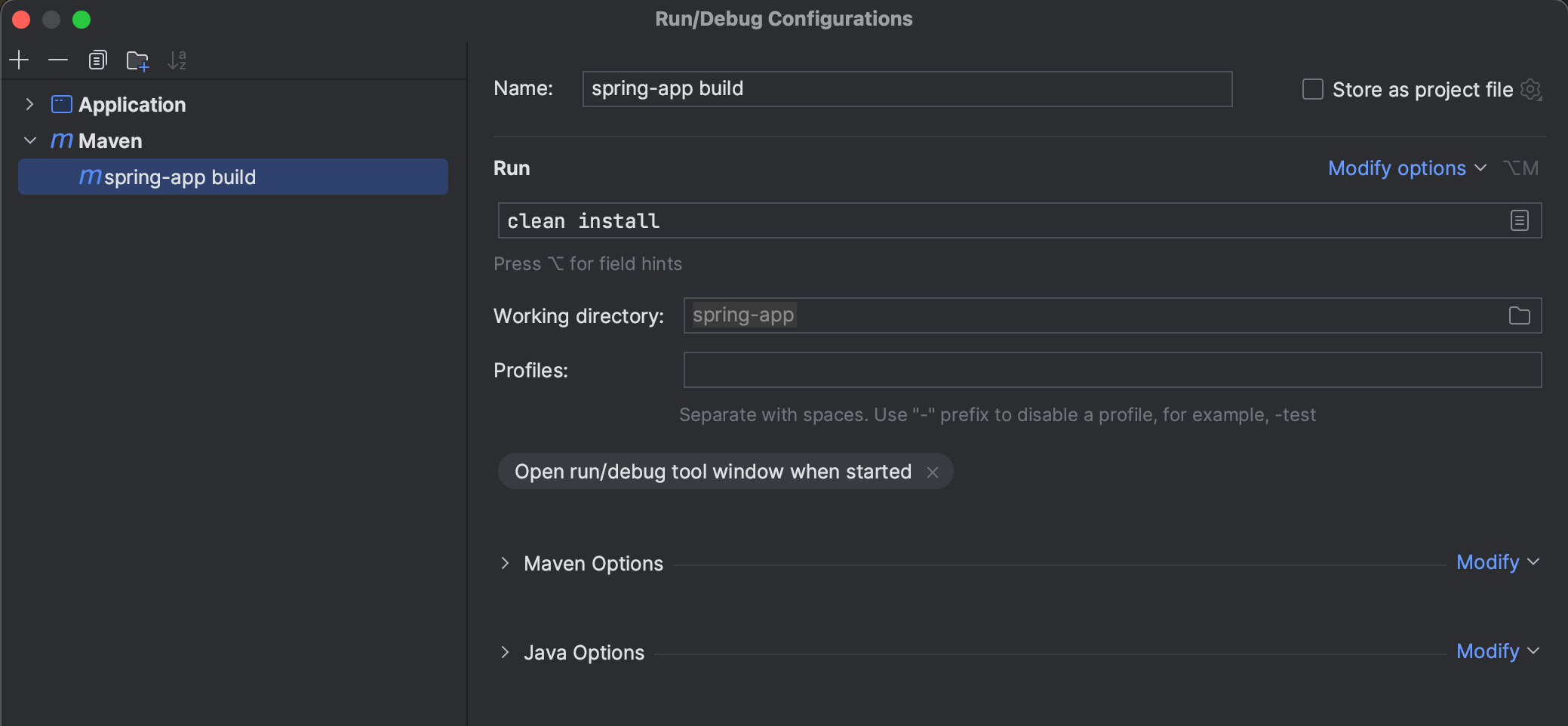
- Add
clean installto the command line section make sure the build runsclean: attempts to clean the files and directories generated by Maven during its buildinstall: compile, test, and package the Java project and copy.jarfile into your local Maven repository
- You need to select the
maven buildrunner to trigger the build (not the previous one) - After finished, you can see the
jar SNAPSHOTwill be generated and moved into your local repository
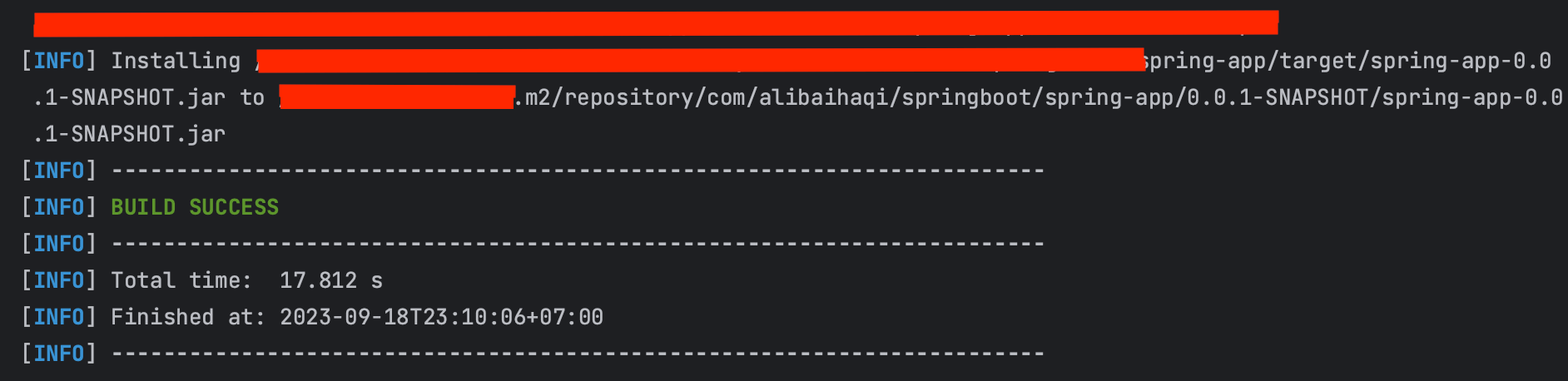
- You can start your built
.jarfile by going to the directory first - Then, run the command
java -jar <jar_name_to_run>.jar
Actuator
To help you monitor your application in Production, you can use Spring Boot Actuator, by add the dependency through your pom.xml file
xml
<dependencies>
	<dependency>
		<groupId>org.springframework.boot</groupId>
		<artifactId>spring-boot-starter-web</artifactId>
	</dependency>

    <dependency> // [!code ++]
		<groupId>org.springframework.boot</groupId> // [!code ++]
		<artifactId>spring-boot-starter-actuator</artifactId> // [!code ++]
	</dependency> // [!code ++]
</dependencies>- For example, after you rebuild the package, run the application, and open the path
http://localhost:8080/actuator, you might see the response like this:
json
{
	"_links": {
		"self": {
			"href": "http://localhost:8080/actuator",
			"templated": false
		},
		"health-path": {
			"href": "http://localhost:8080/actuator/health/{*path}",
			"templated": true
		},
		"health": {
			"href": "http://localhost:8080/actuator/health",
			"templated": false
		}
	}
}- You can use the
/actuator/healthpath as your health check, you might get response like this:
json
{
    "status": "UP"
}- You can enable another features from
actuatorpackage by activating it throughapplication.properties
properties
management.endpoints.web.exposure.include=*properties
management.endpoints.web.exposure.include=health,metrics // specific property might be great to minimize load- You might see additional properties and link
Response
json
{
	"_links": {
		"self": {
			"href": "http://localhost:8080/actuator",
			"templated": false
		},
		"beans": {
			"href": "http://localhost:8080/actuator/beans",
			"templated": false
		},
		"caches-cache": {
			"href": "http://localhost:8080/actuator/caches/{cache}",
			"templated": true
		},
		"caches": {
			"href": "http://localhost:8080/actuator/caches",
			"templated": false
		},
		"health": {
			"href": "http://localhost:8080/actuator/health",
			"templated": false
		},
		"health-path": {
			"href": "http://localhost:8080/actuator/health/{*path}",
			"templated": true
		},
		"info": {
			"href": "http://localhost:8080/actuator/info",
			"templated": false
		},
		"conditions": {
			"href": "http://localhost:8080/actuator/conditions",
			"templated": false
		},
		"configprops": {
			"href": "http://localhost:8080/actuator/configprops",
			"templated": false
		},
		"configprops-prefix": {
			"href": "http://localhost:8080/actuator/configprops/{prefix}",
			"templated": true
		},
		"env": {
			"href": "http://localhost:8080/actuator/env",
			"templated": false
		},
		"env-toMatch": {
			"href": "http://localhost:8080/actuator/env/{toMatch}",
			"templated": true
		},
		"loggers": {
			"href": "http://localhost:8080/actuator/loggers",
			"templated": false
		},
		"loggers-name": {
			"href": "http://localhost:8080/actuator/loggers/{name}",
			"templated": true
		},
		"heapdump": {
			"href": "http://localhost:8080/actuator/heapdump",
			"templated": false
		},
		"threaddump": {
			"href": "http://localhost:8080/actuator/threaddump",
			"templated": false
		},
		"metrics-requiredMetricName": {
			"href": "http://localhost:8080/actuator/metrics/{requiredMetricName}",
			"templated": true
		},
		"metrics": {
			"href": "http://localhost:8080/actuator/metrics",
			"templated": false
		},
		"scheduledtasks": {
			"href": "http://localhost:8080/actuator/scheduledtasks",
			"templated": false
		},
		"mappings": {
			"href": "http://localhost:8080/actuator/mappings",
			"templated": false
		}
	}
}